Find sources with the details you have
Search by URL, DOI, ISBN, title, or keyword to reduce manual entry. Review source details before using your reference.
Less manual entry, flexible citation styles, and simple ways to copy or export your references.
Search by URL, DOI, ISBN, title, or keyword to reduce manual entry. Review source details before using your reference.
Change the citation style to reformat the sources already in your list—all within the same tool.
Copy individual references, copy the whole list, or download your references as a .txt file.
For students, educators, researchers, and editors working on assignments, teaching materials, manuscripts, and editorial projects.
Sign in, then follow these three steps to generate, review, and copy or export your references.
STEP 01
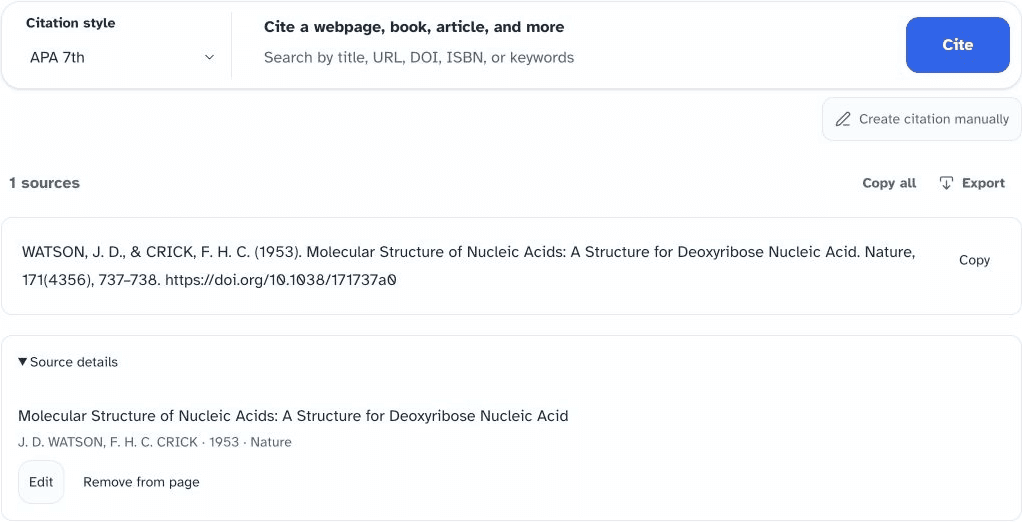
Select APA 7, MLA 9, IEEE, or another style. Enter a URL, DOI, ISBN, title, or keyword, then choose Search Citations. If you already have the details, use Create citation manually.
STEP 02
For a title or keyword search, select the matching source. A URL, DOI, or ISBN lookup can resolve a source directly. Check the author, title, date, and other details against the original.
STEP 03
Copy one reference from its row, choose Copy all for your full list, or export the references as a .txt file when you are ready to use them.
One reference or your whole list
Use Revisy.ai as your APA citation generator, MLA citation generator, or IEEE citation generator by switching formats in the same tool. The options below are popular styles available in this generator; Revisy.ai supports 1,000+ citation styles across its citation system.
Follow your instructor’s or publication’s required style and edition when choosing a format.
Answers to common questions about finding, formatting, and checking your references.
A citation generator formats source details—such as the author, title, date, and URL—into a reference in your chosen citation style. Always check the details against the original source before submitting your work.
Yes. Sign in to use Revisy.ai’s free citation generator, choose APA 7 or another available style, and enter your source details. No payment is required to start generating citations.
Revisy.ai supports more than 1,000 citation styles across its citation system. This generator highlights popular options including APA 7, MLA 9, IEEE, Chicago, AMA, and ACS. Choose the style and edition required by your instructor or publication.
Start with the webpage URL, then review the title, author or organization, publication date, and access details returned by the tool. Select the style your assignment requires—for example, APA 7, MLA 9, or IEEE—and compare the result with the original webpage.
Yes. Copy one generated reference from its row, use Copy all for the full list, or choose Export to download your references as a .txt file. Review the final list before adding it to your paper.
Try a more specific title or keyword, or paste the source’s URL, DOI, or ISBN. If you already have the details, choose Create citation manually and enter them yourself.
Yes. A citation generator helps format references, but source metadata can be incomplete or incorrect. Check the author, title, date, edition, and URL against the source you used.
Learn how to cite common sources, check reference details, and use the citation style your work requires.
01 / WEBSITES
Find the details you need to cite a webpage, with examples in APA, MLA, and IEEE styles.
02 / APA 7
Learn how to format in-text citations and reference entries for websites, books, and journal articles.
03 / MLA 9
Learn how to format in-text citations and Works Cited entries for websites, books, and journal articles.
Return to the generator to find your source and choose a citation style.
Back to generator